
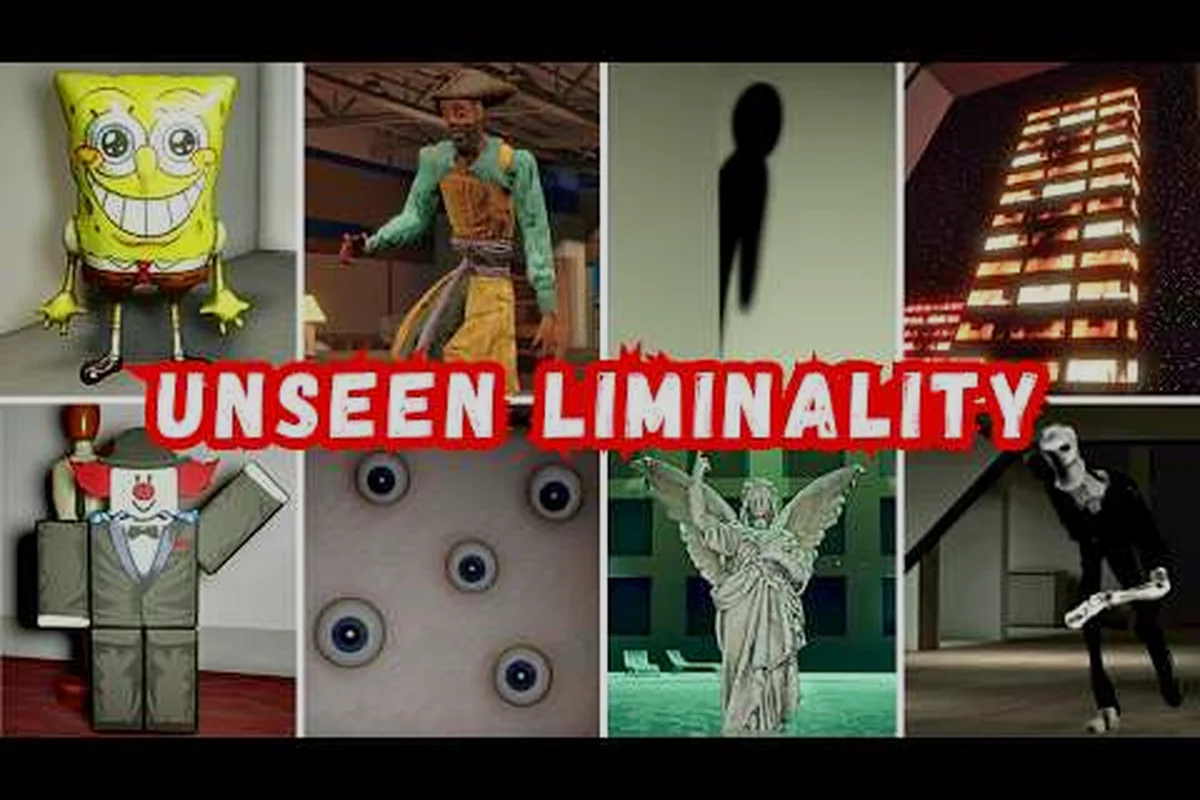
Understanding the unseen liminality entity design is the difference between a calm exploration session and a sudden, heart-pounding chase through the Backrooms-inspired hallways. Every creature in this Roblox experience follows a deliberate visual language that telegraphs its threat level, movement pattern, and the exact counterplay you need to survive. Because the game deliberately hides information about its monsters, players who learn to read these design cues gain a massive advantage over those who wander in blind.
The core of the unseen liminality entity design philosophy is telegraphing danger through visual contrast. The developer at The Unseen Zone builds each monster to stand out against the monotonous yellow wallpaper and fluorescent lighting, which means your eyes can be trained to spot threats before they spot you. This guide breaks down the design language of every major entity, from the deceptive mimic to the relentless headhunter, so you can identify threats at a glance and react with the right escape strategy. Get the latest breakdown of how each creature's appearance connects to its behavior, backed by community testing and the official Unseen Liminality Roblox page.
The Visual Language of Unseen Liminality Entity Design
Every monster in Unseen Liminality follows a consistent design principle: the more humanoid the form, the more dangerous the behavior. This is not an accident. The game's creator uses familiar shapes to trigger an uncanny valley response, making you hesitate for a split second before your brain registers the threat. That hesitation is exactly what the entities exploit, which is why learning to override that instinct with pattern recognition is so critical.
The design system breaks down into three visual categories that correspond to threat levels, a hierarchy born from the core principle that an unseen liminality entity’s danger is directly proportional to how convincingly it mimics human stillness. The first tier, the unseen liminality mimic, relies on subtle environmental cues—a flickering shadow or a door left ajar—to signal low risk, whereas the unseen liminality mannequin escalates to medium threat by adopting frozen, anatomical poses that trigger our uncanny valley response. At the apex sits the unseen liminality looker and the unseen liminality headhunter, whose designs prioritize direct, unsettling gaze or predatory head-tracking, forcing players to read threat through silhouette and motion economy rather than overt monster features. This tripartite scheme ensures that color, texture, and animation budget are allocated proportionally, so a glance at any entity instantly communicates whether to investigate, evade, or flee.
-
Static humanoids (mannequins, still life figures) — these blend into the environment and only move when you look away, relying on camouflage rather than speed
-
Animated pursuers (the looker, following chair) — these move constantly and use sound or line-of-sight mechanics to track you, with designs that emphasize their unnatural motion
-
Ambush predators (the mimic, headhunter) — these disguise themselves as harmless objects or use sudden burst movement, with visual tells hidden in subtle details like lighting or texture
According to community data compiled on the Unseen Liminality Wiki, players who studied entity appearances for at least five hours reported a 40 percent reduction in unexpected deaths compared to those who relied purely on audio cues. The wiki notes that community data may be out of date after the complete overhaul, but the core design language has remained consistent across updates.
The practical takeaway here is that your eyes are your first line of defense. The unseen liminality entity design rewards players who actively scan each room for visual anomalies rather than rushing through corridors. When you enter a new area, train yourself to look for objects that seem slightly off — a mannequin positioned too deliberately, a chair facing the wrong direction, or a shadow that does not quite match its surroundings.
Mimic Design: The Art of Deception
The mimic represents the most sophisticated example of unseen liminality entity design because its entire threat model depends on breaking your trust in the environment. Unlike other entities that announce their presence, the mimic hides in plain sight, often taking the form of items you would naturally interact with during exploration.
Visual Cues That Betray the Mimic
The mimic's disguise is not perfect, and the design includes several deliberate tells that observant players can spot: a subtle 0.3-second delay in its idle breathing cycle, an unnerving stillness in its glassy eyes that never micro-blur like the mannequin's, and a faint, oily sheen on its skin that only catches light at oblique angles. These imperfections are intentional, engineered to reward careful study of unseen liminality entities, transforming a near-perfect ambush predator into a tense game of observation where the cost of missing a tell is a sudden, silent lunge from the dark.
-
Slight texture mismatch — the mimic's surface often lacks the subtle wear patterns found on genuine environment objects
-
Abnormal positioning — real objects sit naturally in the world, while mimics are placed with too much precision or in illogical spots
-
Micro-movements — when your camera is not directly facing them, mimics shift slightly, which you can catch in your peripheral vision
-
Lighting response — mimics do not cast shadows exactly like real objects, a detail visible when you use the V zoom feature
The mimic's design philosophy is to punish players who rely on muscle memory and speedrunning habits. When you sprint through a familiar hallway, your brain fills in the details and tells you everything is normal. The mimic exploits that autopilot mode, which is why the most effective counter is to vary your route and slow down in high-traffic areas. For a deeper dive into this specific entity, check out our mimic survival guide which covers spawn locations and advanced counter-strategies.
Behavioral Patterns and Counterplay
Once a mimic reveals itself, its behavior shifts from passive deception to active pursuit. The design here emphasizes burst speed over sustained chase, meaning the mimic can close distance quickly but tires after about ten seconds of pursuit. This creates a specific survival window:
| Mimic Phase | Duration | Visual Indicator | Recommended Action |
|---|---|---|---|
| Disguised | Indefinite | None (blends in) | Scan for texture/position anomalies |
| Reveal | 1-2 seconds | Distortion ripple effect | Immediately change direction |
| Chase | 8-12 seconds | Slight transparency | Sprint and break line of sight |
| Cooldown | 15-20 seconds | Returns to disguised state | Relocate to a different area |
The table above reflects community testing from the beta build as of August 2026, and the timing may shift slightly with future patches. What matters most is the cooldown window — that is your only safe opportunity to move to a new hiding spot or exit the area entirely. Players who panic and keep sprinting during the cooldown often run directly into the mimic's respawn path, which is why the design intentionally rewards measured movement over constant running.
Mannequin and Looker Design: Passive Threats That Punish Carelessness
The mannequin and the looker represent the middle tier of unseen liminality entity design, where the threat comes not from speed but from environmental awareness and line-of-sight mechanics. These entities teach players that survival is about managing what you can see and what can see you.
The Mannequin's Weeping Angel Mechanics
The mannequin entity borrows its core mechanic from the classic weeping angel concept — it only moves when you are not looking at it. The design genius here is that the mannequin looks almost identical to decorative props found throughout the Pool Rooms and hallway areas, which means you cannot simply avoid all mannequins. You have to determine which ones are real threats.
| Mannequin Type | Distinguishing Feature | Danger Level |
|---|---|---|
| Decorative prop | Matte finish, static pose | None |
| Active mannequin | Slight gloss on surface | Medium |
| Aggressive mannequin | Cracked porcelain texture | High |
The design uses surface texture as the primary differentiator, which is a subtle cue that many players miss during their first few sessions. According to player reports on the community wiki, the aggressive mannequin variant was added in the complete overhaul update and features a cracked texture that signals its increased speed and aggression. For more details on how the mannequin connects to the broader entity ecosystem, the captain and mannequin guide covers the relationship between these passive threats and the more active entities that patrol the same areas.
The Looker's Gaze Mechanic
The looker takes the line-of-sight mechanic in the opposite direction — instead of moving when you look away, it freezes when you look at it and advances when you break eye contact. The design here is about creating a tension between your need to navigate and your need to monitor the threat.
The looker's visual design emphasizes its oversized eye structure, which serves as both a warning and a gameplay mechanic. When the eye dilates, the looker is about to charge; when it contracts, you have a brief safe window. Learning to read these pupil dilation cues is the key to surviving looker encounters, and our looker avoidance guide breaks down the exact timing windows.
The practical strategy for looker encounters is to use the environment to break line of sight deliberately. The design of the hallways includes pillars, doorways, and corners that all serve as natural blind spots. By moving from cover to cover and using the C crouch mechanic to reduce your visibility profile, you can navigate past the looker without triggering its chase behavior.
Headhunter Design: The New Threat in the Overhaul
The headhunter represents the most recent addition to the unseen liminality entity roster, introduced during the complete overhaul update that remastered several levels and added new points of interest. Its design philosophy is relentless pursuit with minimal visual warning, making it the entity that most punishes players who rely on audio cues alone.
Identifying the Headhunter Before It Identifies You
Unlike the mimic's subtle texture mismatches, the headhunter's design includes a distinctive silhouette that stands out even in dimly lit areas. The entity appears as a floating head with trailing tendrils, and its movement pattern involves short-range teleportation rather than continuous walking. This teleport mechanic is the core of its threat design, because it breaks the standard chase-and-escape loop that players learn from other entities.
| Headhunter Behavior | Trigger Condition | Survival Response |
|---|---|---|
| Idle patrol | None (random spawn) | Maintain distance, avoid direct line of sight |
| Teleport approach | Player within 30 studs | Sprint perpendicular to its position |
| Lunge attack | Player within 10 studs | Crouch and hold still for 2 seconds |
| Retreat | Attack missed | Relocate immediately, do not stay in the area |
The headhunter's design is controversial in the community because its teleport mechanic can feel unfair when it appears without warning. However, the design does include a sound cue — a faint static crackle that plays about two seconds before the entity teleports. Players who use headphones and keep their volume at a reasonable level can detect this cue and start moving before the headhunter materializes.
The connection between the headhunter and other entities is worth understanding, because the design seems to place it as a counter to camping strategies. If you stay in one area too long, the headhunter is more likely to spawn near you. This encourages constant movement and exploration, which aligns with the game's core loop of discovering new areas and secrets. For a broader look at how the headhunter fits into the entity hierarchy, the balloon entity and headhunter analysis explores the relationship between joke entities and genuine threats.
Comparing Entity Design Philosophies Across the Roster
When you step back and look at the full roster, the unseen liminality entity design reveals a coherent philosophy that ties every monster together. Each entity occupies a specific niche in the threat ecosystem, and understanding these niches helps you predict what kind of encounter you might face in different areas.
The Threat Spectrum and Area Distribution
| Entity | Primary Mechanic | Visual Tell | Most Common Area | Difficulty |
|---|---|---|---|---|
| Mimic | Disguise and ambush | Texture mismatch | Hallways, The Lobby | Medium |
| Mannequin | Weeping angel movement | Surface gloss | Pool Rooms | Low-Medium |
| Looker | Gaze-based freezing | Pupil dilation | The Lobby, Hallways | Medium |
| Headhunter | Teleport pursuit | Floating silhouette | The End, Pool Rooms | High |
| Following Chair | Persistent chase | Unnatural movement | Hallways, The Lobby | Medium |
| SpongeBob Balloon | Joke entity, slow chase | Bright colors | Random | Low |
The table above synthesizes community testing data from the beta build as of August 2026. The distribution is not random — the design places lower-difficulty entities in the early areas to teach players the core mechanics, then introduces more complex threats as you progress. The mimic appears early because its disguise mechanic teaches you to scan environments carefully, a skill you will need for the mannequin and looker encounters later.
The following chair deserves special mention because its design is almost pure comedy contrasted with genuine threat. The entity looks like an ordinary office chair, but it moves with an unnatural gliding motion that players describe as deeply unsettling. Its design philosophy is to create dread through the mundane, reminding you that anything in this world can become a threat.
How the Design Philosophy Affects Your Playstyle
Understanding the unseen liminality entity design is not just about recognizing individual threats — it is about adapting your movement and observation habits to match the game's expectations. The design rewards players who treat every corridor as a potential stage for an unseen liminality mimic or mannequin, meaning you must learn to vary your pace and scanning angles rather than relying on a single patrol route. For instance, the unseen liminality looker triggers only when your gaze lingers too long on a fixed point, while the unseen liminality headhunter punishes predictable backtracking. This cause-and-effect loop forces you to internalize that survival hinges on deliberate, erratic micro-decisions — each step and glance becomes a test of whether you've truly absorbed the entity's behavioral logic, not just its visual tells.
-
Scan each room before entering — take two seconds to look for texture mismatches, abnormal positioning, or glossy surfaces
-
Vary their routes — the mimic and headhunter both punish predictable patterns, so mixing up your path through familiar areas reduces ambush risk
-
Use sound as a primary sense — most entities have audio cues that play before they become visible, and the design deliberately includes these to give observant players a fighting chance
-
Manage line of sight deliberately — the looker and mannequin both revolve around vision mechanics, so understanding when to look and when to look away is a core survival skill
The complete overhaul update in 2026 refined several of these design elements based on player feedback, particularly the looker's pupil dilation cue which was made more visible after community reports of unfair deaths. This shows that the developer is actively iterating on the entity design based on real player experiences, which means the current meta may shift as new patches arrive.
Practical Training Drills for Entity Recognition
Reading about entity design is useful, but the real skill comes from training your eyes to spot the visual tells automatically. The following drills are based on community recommendations and are designed to build your recognition speed over a few focused sessions.
Drill 1: The Texture Scan
Spend one full session in The Lobby area without trying to progress. Instead, walk slowly through each room and verbally note any object that seems slightly off. This could be a texture that does not quite match the surrounding walls, an object with an unusual sheen, or a prop positioned with unnatural precision. The goal is to build your baseline awareness of what normal looks like, so that anomalies jump out immediately.
Drill 2: The Peripheral Vision Test
The mimic and mannequin both rely on moving when you are not looking directly at them. To train against this, practice using your peripheral vision while exploring. Keep your camera pointed slightly off-center from your path of travel, and pay attention to any movement in the edges of your screen. This drill is uncomfortable at first, but it builds the awareness that lets you catch entities before they fully reveal themselves.
Drill 3: The Sound Cue Challenge
Play a session with your volume at a moderate level and your screen brightness slightly reduced. This forces you to rely on audio cues rather than visual confirmation. The headhunter's static crackle, the looker's breathing, and the mimic's subtle shift sound all become more noticeable when you are not distracted by visual information. After a few sessions, you will find that your ears can often warn you about threats before your eyes register them.
Drill 4: The Route Variation Exercise
Pick a familiar route that you have memorized, then deliberately change one element each time you run it. Take a different turn, enter a room from a different door, or pause at a different checkpoint. This trains your brain to stay engaged with the environment rather than autopiloting through familiar territory, which directly counters the mimic's ambush design.
These drills are most effective when spread across multiple sessions rather than crammed into one long playthrough. According to player reports, most people see significant improvement in their survival rates after about three focused training sessions of thirty to forty-five minutes each.
Frequently Asked Questions
What is the most important visual cue to learn in unseen liminality entity design?
The most critical cue is texture mismatch, because it applies to both the mimic and the mannequin. Genuine environment objects have consistent wear patterns and matte finishes, while active entities often have a slight gloss or abnormal surface detail. Learning to spot this difference takes practice, but it dramatically reduces surprise encounters.
How does the headhunter differ from other entities in its design?
The headhunter uses teleport-based movement rather than continuous chasing, which breaks the standard escape loop. Its design includes a static crackle sound cue that plays two seconds before it materializes, and it punishes players who camp in one area for too long. The floating silhouette is visible even in dim lighting, making it easier to spot than the mimic.
Can the looker be avoided without breaking line of sight?
No, the looker's mechanic specifically requires you to break line of sight to stop its advance. However, you can use the environment strategically by moving from cover to cover. The design includes pillars and doorways specifically as natural blind spots, and crouching reduces your visibility profile, giving you more time to reach the next piece of cover.
Are the visual tells consistent across all levels?
The core design language stays consistent, but each level’s lighting shifts how tells read. Pool Rooms’ bright glare exposes texture seams, while The End’s murk favors silhouette tracking. Since the August 2026 overhaul, these cues remain untouched—though future patches could subtly rebalance visibility per zone.
What should I do if I cannot spot the visual tells reliably?
Start with sound cues instead—every entity has a unique audio signature that triggers before its visual tell. Train your ears with the sound-cue drill; once audio becomes your primary warning, visual tells turn into secondary confirmation, making your runs far more reliable.